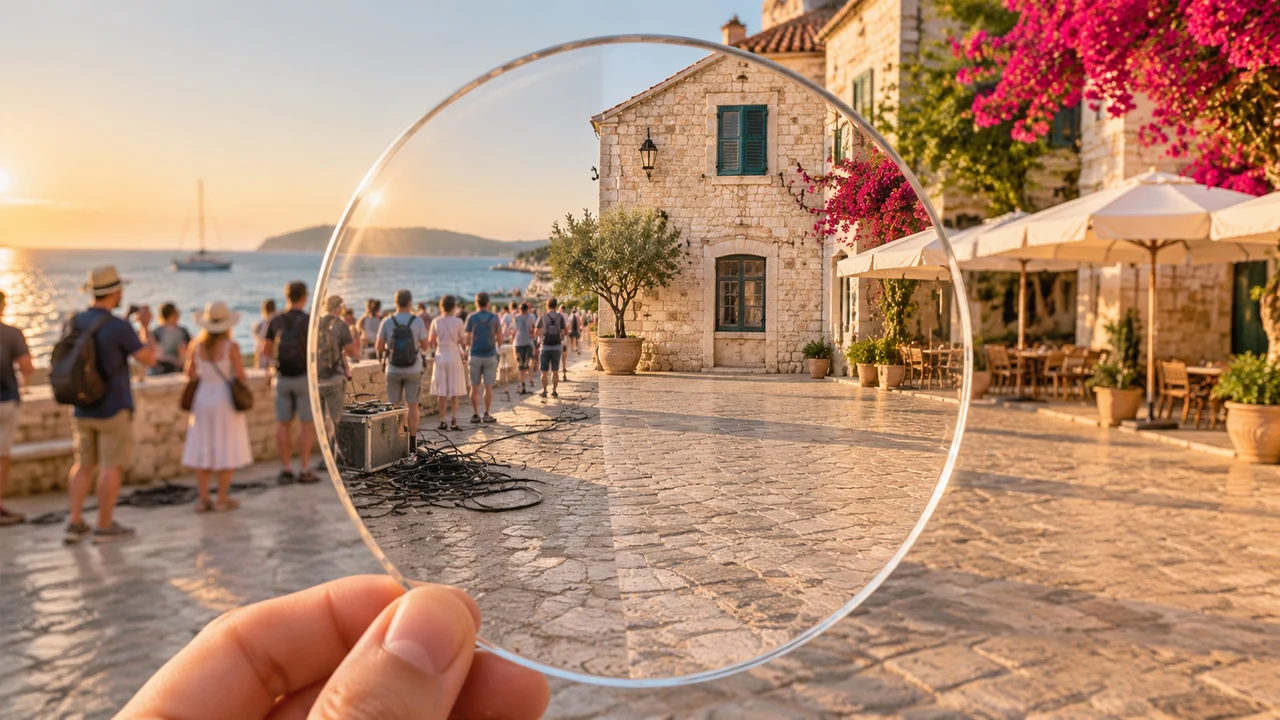
仿制图章和修复画笔在平坦天空或素色墙面上很好用,但一旦水印横跨人脸,或者停着的汽车挡住了有图案的鹅卵石路面和建筑阴影,它们就很快失效。具备上下文感知能力的 AI 清理之所以有效,是因为它会先读取周围的几何结构、透视线和光线方向,再重建被遮挡部分背后本该存在的内容。
在 Imagine AI 里,有两个专门的工作台负责图片清理:去水印工具 处理半透明覆盖层、logo、日期戳和字幕,物体移除工具 处理路人、电线、桌面杂物、污渍和背景干扰。两个工具都运行在 GPT Image 2.6 上,只重建目标区域,同时保持整张图的锐度。
去水印 vs 物体移除:该用哪个工具?
从 AI 图像工具中心 选对入口,模型才能从正确的保留指令开始工作:
| 清理任务 | 最合适的 Imagine AI 工具 | 工具优先保证什么 |
|---|---|---|
| 半透明的图库预览水印(你拥有或有权编辑的图片)、角落 logo、审稿章、相机日期戳 | 去水印 | 把前景覆盖层的透明度与底下的皮肤、布料或纹理分开,同时不偏色。 |
| 路人、抢镜者、垃圾桶、电线、桌面线缆、咖啡渍、墙上插座 | 物体移除 | 擦除立体的物体和投影,再延续其后的地板纹理、植被或砖石结构。 |
| 替换标题或招牌文字,但保留原有字体风格而不是直接擦掉 | 文字替换 | 原地换掉文字,同时匹配原图的字体、字重和透视。 |
| 裁掉边缘干扰后,扩展过紧的边界 | 扩图 | 在画面外围重新生成内容,避免主体比例被破坏。 |
(去除审稿标记或 logo 之前,请务必确认你拥有该图片的权利或修改授权。)
如何干净地去除水印、日期戳和字幕
当时间戳、审稿覆盖层或角落字幕压在细节丰富的纹理上——比如亚麻织物、砖墙、头发或水面波纹——模糊的提示词可能让模型重画整张图。把 去水印 里的指令集中在位置和背景重建上:
1. 清理角落 logo 或时间戳
Remove the orange camera date stamp in the bottom-right corner and reconstruct the natural cobblestone texture and warm evening shadow underneath. Keep the rest of the street scene, colors and framing completely unchanged.
2. 清理横跨主体的中央水印
Remove the semi-transparent diagonal watermark across the center of the image. Reconstruct the continuous wool jacket texture, lapel seam and soft studio lighting beneath the letters without altering the person's face or pose.
3. 去除字幕条或说明文字
Erase the white caption text near the bottom edge and restore the continuous wooden tabletop grain behind it. Do not crop the image or change any other object.
如果你想用新文案替换文字,而不是彻底删掉,请改用 ,或者阅读我们的 获取字体保留技巧。
如何用 AI 物体移除擦掉游客、杂物和干扰
在 里清理旅行照、房产挂牌图或产品图时,记得同时说明物体本身和它的阴影或倒影。把椅子擦掉后还留着一块深色投影,修改痕迹会非常明显。
按场景分类的可复制物体移除提示词
-
旅行与建筑(去除游客和器材):
Remove the tourists standing along the stone wall on the left and the black cable case on the courtyard floor. Reconstruct the continuous limestone blocks, sunlit mortar lines and distant sea horizon. Keep the main building, olive tree and outdoor café umbrellas unchanged.
-
房产与室内设计(清理房间杂物):
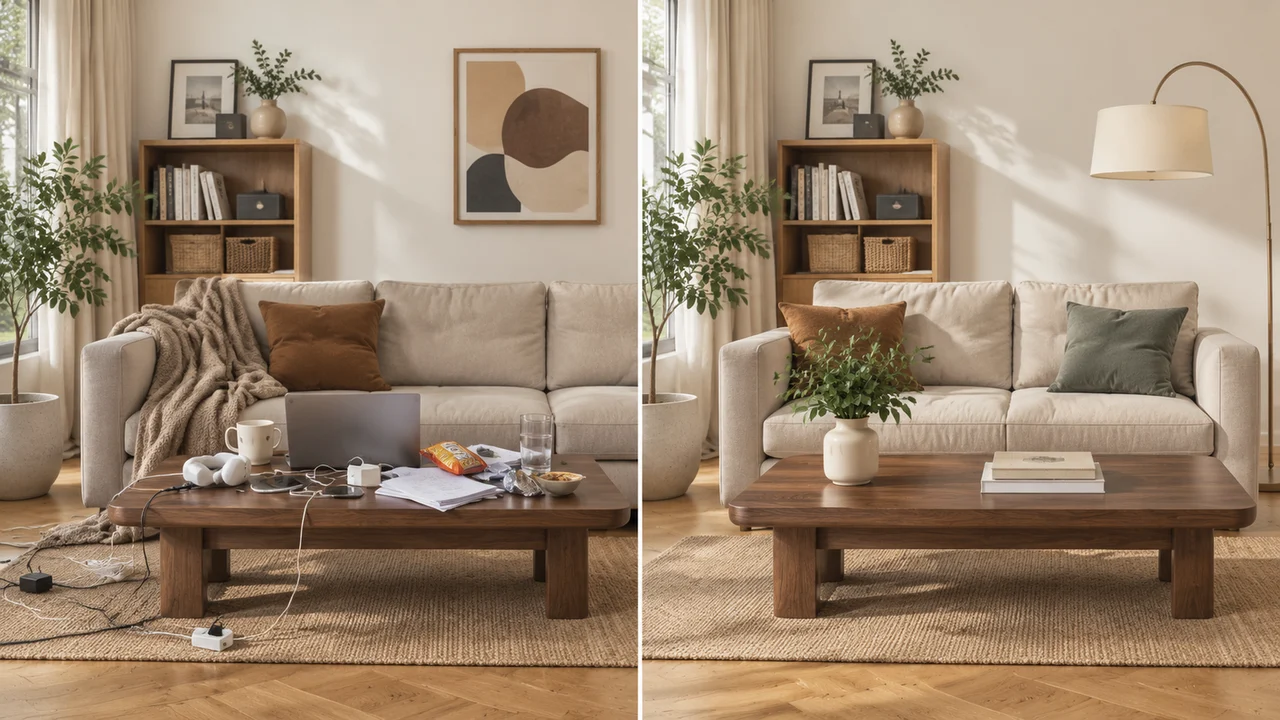
Remove all laptop chargers, power strips, snack wrappers and loose papers from the walnut coffee table and woven rug. Reconstruct the clean walnut wood grain and jute rug weave. Keep the sofa, cushions, framed wall art, indoor plant and window light identical.
-
电商与服装(去除吊牌和影棚支架):
Remove the plastic price tag hanging from the sleeve and the metal light stand visible at the far right edge. Reconstruct the seamless neutral studio backdrop. Keep the model and garment unchanged.
如果你想重新设计整个房间,而不仅是清理桌面杂物,可以把物体移除和 搭配使用,或者参考我们的 优化产品布景。
什么时候用蒙版重绘,什么时候用文字指令清理
Imagine AI 里的 GPT Image 2.6 同时支持指令驱动的清理和蒙版区域编辑:
- 用指令驱动清理:在 或 里,当目标容易说清楚(“左边那个红色垃圾桶”“右下角的日期戳”),或者在几个小位置重复出现时,用这种方式。
- 用涂抹蒙版:在 里,当场景中有五个相似物体、而你只想移除其中一个时,涂出准确的物体以及它阴影周围的一小圈边缘,再描述应该填充透明区域的背景材质。
导出前的快速检查清单
下载清理后的图片之前,放大到 100% 检查四件事:
- 重复的直线:地板、窗框、瓷砖和地平线在修复区域两侧是否笔直连接,没有弯曲?
- 阴影与倒影清理:物体的地面投影或玻璃倒影,是否和物体一起消失了?
- 未改动区域:确认编辑区域之外的人脸、产品标签和背景细节逐像素保持一致。
- 文件大小与格式:如果要把清理后的照片上传到网站或店铺,先用免费的本地 或 工具,导出优化后的 WebP 文件。
现在就在 或 清理你的第一张照片。
